XRP / USDC · BINANCE
Create your XRP alert.
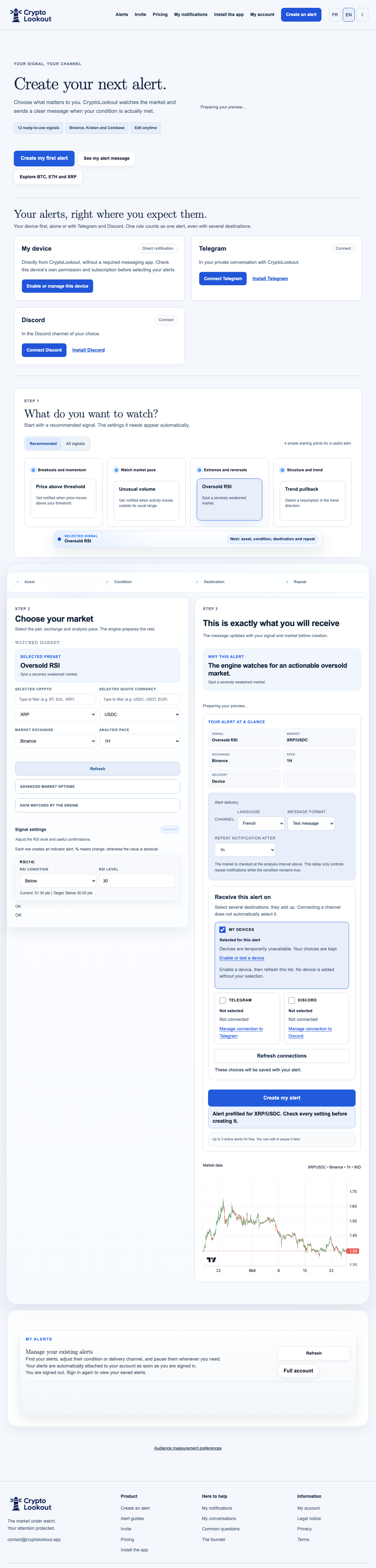
Watch XRP/USDC on Binance with your own price or RSI conditions. The rule monitors the XRP token on the market you select.
Configure a XRP price alertA price reference for XRP/USDC
Want to review XRP when it crosses a level you have defined? The button prepares a price-rise scenario for XRP/USDC; you can choose another direction in the builder. Your threshold is expressed in USDC, without a suggested price target.
XRP’s RSI depends on the selected market
Choose the RSI scenario and check its timeframe before activation. RSI for XRP/USDC on Binance can differ from another pair or exchange. An alert reports your condition; it does not place an order.
Check your market and channel
This page prepares XRP/USDC on Binance. Check that this exchange is selected in the builder. Price and RSI data on hourly candles were available during our check on 25 October 2026. Other pairs, exchanges and timeframes must be checked in the app. Connect Telegram or Discord and verify your settings: a message requires an active rule, a matching condition and an available channel.
Explore other crypto alerts
Ready to set your XRP condition?
Review the market, threshold and notification channel before activating your rule.
Configure a XRP price alertA complete RSI example
Example configuration: XRP/USDC on Binance spot, RSI below 30, 14-period Wilder calculation, 1-hour candles. The interval describes the candles, not a guaranteed notification delay. Check the repetition setting separately before activation.
Understand the preview and the trigger value
New RSI alerts use the same 14-period Wilder measurement and closed candles as the preview. A perfectly flat sequence equals 50. Missing or stale measurements never manufacture a trigger. Alerts created before this version keep their historical calculation, which can include the current candle: no existing threshold or setting is automatically changed. The value can change between successive candle closes; check the observation time.
A 1-hour reminder is a separate setting: it permits another message once the configured delay has elapsed while the condition remains true and the destination is available. It does not turn the RSI into a 1-hour indicator or guarantee an exact delivery time.
Use this example: XRP RSI 30 · 1 hour · BinanceThis example is not investment advice. A low RSI can remain low; no reversal or trading action is guaranteed.
Three ways to receive your alerts
Device
Receive a direct CryptoLookout notification without Telegram or Discord. Use a compatible browser or installed web app, allow notifications, confirm the test and select the alerts that should reach it.
Enable this deviceTelegram
Receive messages in your private conversation with the CryptoLookout bot. Sign in to the site, open the connection link, start the bot and verify the linked destination.
Connect TelegramDiscord
Receive messages in a chosen text channel. Choose a server and channel where you can manage webhooks, authorize the integration and verify the connection.
Connect DiscordOne rule can target several destinations. Device registration, a message accepted by a service and a notification actually received are different steps. Check the selected destinations before activation.
Configure XRP, not another asset
The RSI example uses XRP/USDC on Binance and 1-hour candles. The price alert keeps its threshold and analysis interval for you to choose. Start with a price threshold near the actual market or a Wilder RSI crossing below 30 on closed candles. These are editable examples, not trading recommendations. Price and RSI are different conditions; check the selected pair, interval and recipients before creation.
Configure a XRP price alert Use this example: XRP RSI 30 · 1 hour · Binance